Twenty-one, blackjack! Keeping up tradition, the stable AlterCPA v.21 release lands on the fourth day of an even month! We didn’t manage to slim down by summer: we packed on 80 improvements, fixes, and new features. In this release: postbacks, bonuses, domains, and we’re too lazy to list the rest — read on!
Domain confirmation
Ad networks decided to delight everyone with a new requirement to confirm domain ownership. So we added a couple of mechanisms for that confirmation:
- Uploading a verification file to the domain root
- Adding a meta tag to the ad page
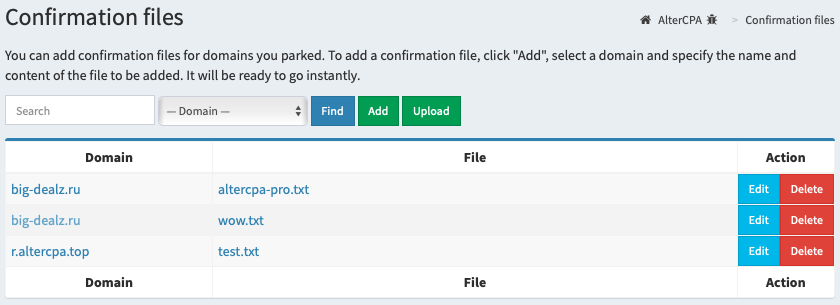
The first option gives affiliates a new “Domain confirmation” section in the “Flows” menu. Open the section, click “Add”, pick a domain, specify the file’s name and contents, and it all works. If you already have a ready-made file — click “Upload”, pick a domain and the file, and it works again.
The second option adds two fields to the Flow settings — arbitrary code for the site’s header and footer. They go, respectively, right before the closing head and body tags on the site. The affiliate can drop any verification tag in there — from Facebook, as well as Metrica, Google, or even TikTok.
Bonus program
Have your affiliates gotten so spoiled that money alone isn’t enough for them anymore? No worries — now you can turn on a bonus program in your network.
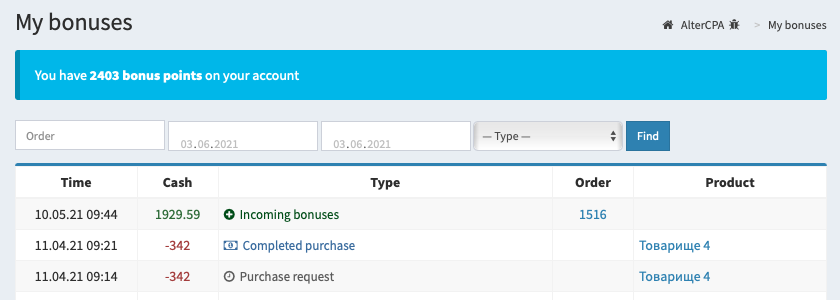
- The affiliate earns bonus points for confirmed leads and stockpiles them in a separate bonus account.
- The number of points doesn’t have to be fixed — it can also depend on the payout amount and the network’s earnings. To stay safely in the black, you can simply gift the affiliate a quarter of the network’s profit.
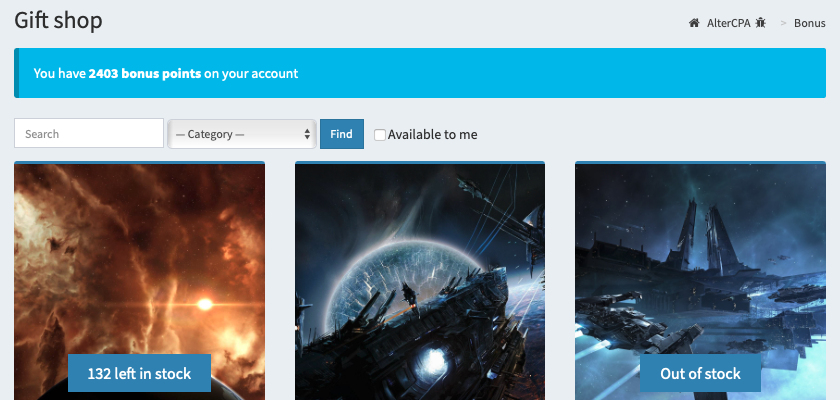
- The affiliate can spend accumulated points in the bonus store. Admins stock it with items available for purchase, and some items can be listed in limited quantities.
- A purchase request from the affiliate lands in the admin’s dashboard. Reviewing the request and handing out the bonus is done manually. Once a request is approved, the item’s page can reveal a hidden block — for instance, with instructions on how to claim it.
You can never have too many postbacks
AlterCPA used to let an affiliate set just one postback, either globally or inside a Flow. We felt that wasn’t enough, so we added extra postbacks on top.
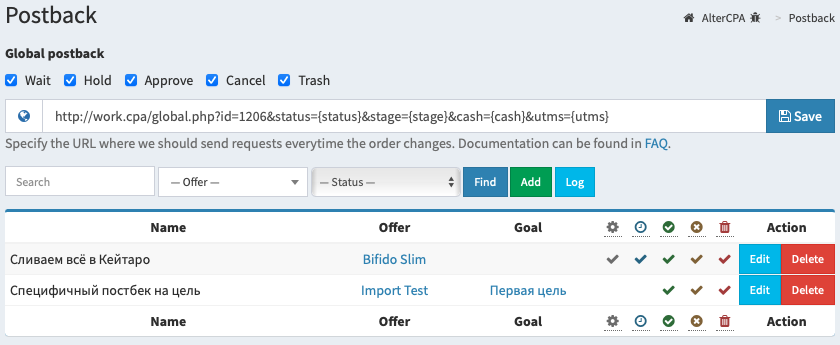
Here’s what’s good about them:
- They’re always global, but you can tie them to a specific status, offer, or even a goal within it. That makes it easy to set up postbacks for registration and deposit.
- There’s no limit to how many you can create. You can set up several postbacks that fire at the same time — for example, notify your tracker that a lead came in and send a notification to Telegram.
Of course, there are a few downsides too:
- A single postback can only be tied to one offer or goal. If you need identical postbacks for different offers, you’ll have to add each one separately.
- A postback always fires when a lead moves into the selected status. If the same, unchanged postback is set on several statuses, it will still be sent every time — there’s no protection against duplicate sends.
Offer import and export
The mechanism for copying offers within a network and between networks showed up in AlterCPA about five years ago and has barely changed since. We rewrote it from scratch, significantly expanding what it can do.
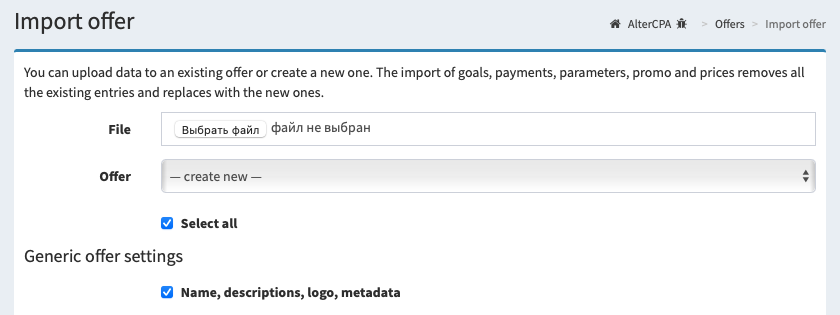
- Added support for goals. They carry over to the new offer with all their parameters.
- Improved how payouts are handled. Tied them to goals. You can update them together or separately — the links won’t break.
- Split site import by type. You can automatically replace sites of the selected type or add the imported sites to the existing ones.
- Auto-replacement of site paths got smarter and now follows our site-naming guidelines.
- The offer’s promo materials export automatically along with their files.
- Traffic sources, technical capabilities, and all the other handy checkboxes export automatically too.
Arbitrage teams
Arbitrage teams are coming out of the shadows. From now on, this isn’t a secret section for grouping stats, but a full-featured tool for teamwork.
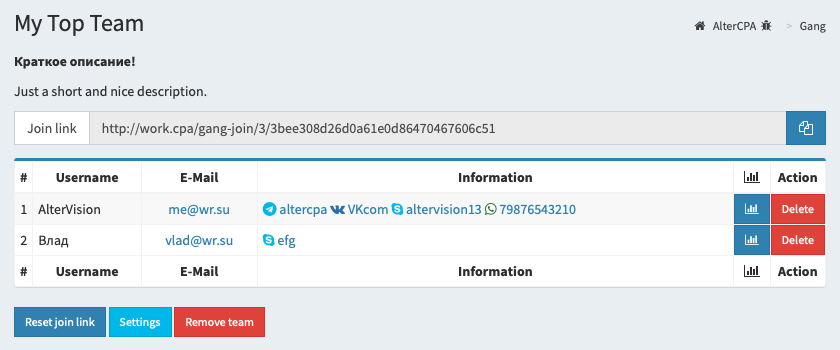
- Any affiliate can create their own arbitrage team. Of course, this option is disabled by default, but you can allow it in the advanced settings.
- The head of an arbitrage team can manage its membership on their own. On one hand, they now have a member list with a remove button. On the other, they got a magic join link that lets any user on the network join the arbitrage team.
- The lead can turn on a home page for all team members, add a welcome note and teamwork rules to it, and show the list and contacts of the members.
Personal and team blacklists
Blacklist handling in the traffic filtering system picked up three useful new features.
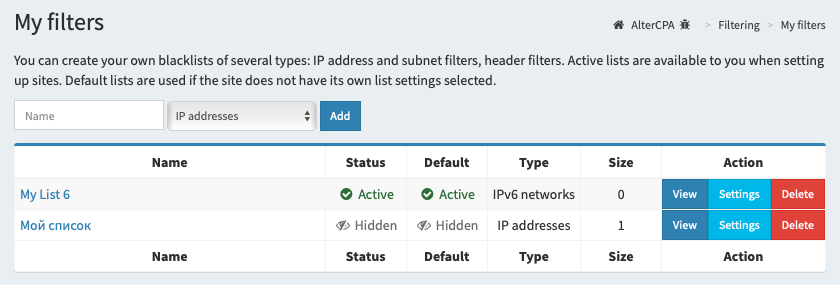
- Among your blacklists, you can pick the ones used by default. When no specific blacklists are selected in a filter site’s settings, the ones marked with the “Default” checkbox are used instead. This lets you build a base set of filters useful to everyone, and add filters that only come in handy for special cases.
- Setting up blacklists is no longer an admin-only privilege. Any user can create their own blacklists for traffic filtering. They’ll be available, of course, only to their author.
- Since we now have full-featured teamwork, we’ve also added team blacklists. Either the team lead or the whole team at once can have access to their settings. Any team member can use them.
On top of that, we improved the filtering mechanisms themselves, adding two useful features: language analysis and trash visits.
- Checking a visitor’s language lets you filter out users who are most likely using residential proxies from a foreign country while keeping their browser language unchanged.
- Trash visits let you discard the first visitors that pass through your filter. Useful if you know for a fact that a handful of bots are guaranteed to show up right after a link gets published.
Statistics for affiliates
Turns out we’d forgotten to build a traffic sources report. Fixing that now. The report showed up both as its own section and as an item in the click analytics hierarchy. Traffic sources are a niche tool rarely used in networks, so the report isn’t active by default. Don’t forget to turn it on in the advanced settings.
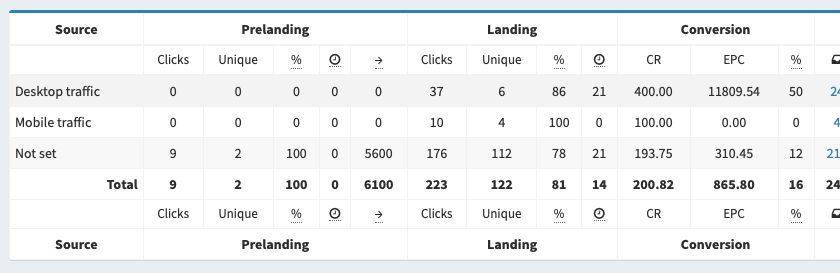
Last year we released an API for uploading ad spend. Six months later, we added the ability to pass the click price directly in the Flow link. This time we’re adding a fully manual mode — an ad spend upload form. It fully replicates what the API does, right inside the affiliate’s dashboard.
Flow symbol code
On top of its ID, a Flow now also has a symbol code. Sounds completely confusing at first, but it’s actually pretty interesting.
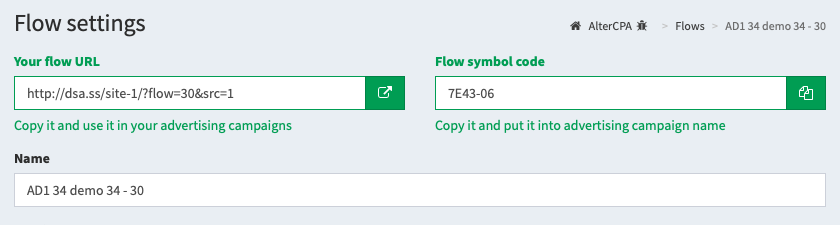
You’ve almost certainly run into Flow symbol codes before, when setting up ad campaigns for apps on Facebook. Those cryptic characters you’d stick in the campaign name — that’s exactly it.
Along with the symbol code came some interesting ways to use it:
- You can use the symbol code with postbacks that create leads for “external” offers. When working with apps, you can’t generate a click ID for every install, but the Flow code is easy to pull from the ad campaign name or from analytics.
- With a unique conversion ID, you can not only create leads but also push them through statuses. That makes it possible to build a full tracking cycle inside any app.
- The Flow’s symbol code also lets you fetch the Flow itself and its link. That’s handy for apps with a built-in cloaker. Got a symbol code? Fetch the Flow, grab the link, show it in a WebView. No code? Show the dummy app instead.
A quick rundown of the remaining fifty-odd improvements
As always, there’s a pile of nice little extras:
- A fresh news counter showed up. We track when a user last opened the news feed and show how many news items have appeared since. Similar counters were added for payout requests and support tickets.
- Improved the parked domain check automation. Domains with IPv6 errors will no longer pass. Problem domains will also stop clogging up the system — they’ll get deleted automatically.
- Reworked downloading ready-made landers from a Flow. You can now download a ready lander for the country you need, with the matching price tags already in place. Pixels also showed up — both on the landers themselves and on the “Thank you” page.
- Added geo-blocking. Offer settings now let you block any leads from unsupported countries. You can drop them silently or show buyers a notice.
- Incoming leads can now be confirmed automatically. Handy for SOI offers. Auto-confirmation can be turned on not just for an offer, but for its individual goals too.
- Dropped Disqus for Commento in the news comments. Easier to install, no ads, no lag, and you can log in straight from inside the network. A dream!
- The docs from the AlterCPA Pro dashboard are now available to admins right inside the network.
- Added postback resending. A resend button showed up in the postback request log. Handy if your tracker decides to take a nap at the worst possible moment. Speaking of which — why even run a separate tracker when you’ve already got AlterCPA?
- Admins got a tool for auditing user sessions. If it looks like an affiliate has been stamping out fake accounts to trick you — check their visit log in the “People” section.
- Traffbacks showed up in the settings for TDS, redirect sites, and split tests.
- TDS learned to analyze offer activity and availability for affiliates. It’s not the lightest procedure, but it makes smartlinks even smarter.
- Agencies got a link generation tool for offers. It’s somewhat similar to the Flows affiliates use. Combined with the new postbacks, it simplifies reselling offers without an API.
Future plans
We’ve decided to ease off on adding new features to AlterCPA for a bit and get serious about documentation. We usually close out a couple dozen tasks per version — this time it was four times that! We ended up accidentally delivering almost everything on our roadmap. We should save something for later, or there’ll be nothing left to build. So the next version is scheduled for release on September 13.