404! Happy professional holiday to all the affiliates and creators of the internets out there! And, as tradition has it, we’re rolling AlterCPA v20 out into stable release. In this version, we decided not to sweat the small stuff and focus entirely on three big improvements that had been waiting their turn for a long time: the dialer, styling, and a cozy little blog.
Let’s start with the dialer. AutoCall used to be a separate product that required buying, installing, and configuring — and generally didn’t have even a hint of convenience going for it. We decided to cut our users’ already considerable suffering short and folded AutoCall right into AlterCPA. We wrote more about AutoCall here: https://cpa.moe/en/callcenter.html
Yes, that’s right, AutoCall is also available in AlterCPA Moe, our free CRM for sales automation. Same as logistics, warehouse accounting, deep expense-and-profit analytics, and all the other tools. Free, with no limits. Because we can.
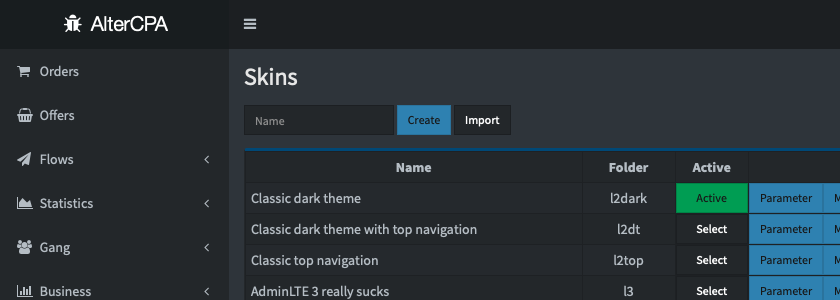
Styling was the second big improvement in this version. We’ve added the ability to create your own custom styles for AlterCPA’s internal interface. For now this is a test feature that will get significantly better down the road. You’ll be able to change the look of your network, edit templates, resources, CSS and JS files, and use ready-made styles. If you want, you can even let your users pick the network’s look themselves.
As our first stab at styling, we present you with a dark theme. So far it only has a black navigation bar, but already in both horizontal and vertical form. All system themes update automatically and keep pace with the platform.
The news section went through a number of small but useful changes. It’s now grown into a full-fledged, cozy little blog. Managing publications moved to its own item under the “Management” section. News posts can now have a picture and a short description added to them. News categories can be set up to your own taste. You can tag a news post with a language and run your own news feed in each language.
Downloading ready-configured sites from the flow page is becoming pretty much the de facto standard for merchant affiliate networks. We made the process of “finishing” such a site to your own taste a little easier for the affiliate. Now every pixel and analytics tracking code specified in the flow will automatically end up in the site’s archive — both on the site itself and on the built-in “Thank you” page.
Where sites aren’t downloaded, domains get parked instead — no exceptions. We’ve slightly reworked the concept of default domains to make using them more convenient and pleasant. You’ll no longer need to pick a single domain for all three types of link generation — redirects, landing pages, and pre-landers. You can now pick a domain separately for each link type. The default domain you pick will also be used in the preview links for every site on the network.
There’s almost no room left in this release for the nice little extras, but a few useful ones showed up anyway:
- For convenience, we slightly reworked the flows page in the affiliate’s personal account. Two extremely handy buttons were added: create a new flow for the same offer, and go to the offer itself.
- We rethought the bulk order editing tool. It no longer just changes an order’s status — it can also move orders between companies, recalculate, freeze, and unfreeze payouts, all based on a list of order IDs or other handy criteria.
- We automated working with images in text. Now any picture pasted straight into the text gets automatically uploaded to the server, with no fiddling around with uploads required. Just Ctrl+C — Ctrl+V in the editor.
- The API log now has a filter by tag — that same magic z parameter we’ve been recommending you add to every postback. Finding buggy postbacks just got a lot easier.
- A couple of handy new additions landed in the internal system APIs: exporting news and the user list.
- Users now have an API for working with parked domains and direct parking. Still in test mode for now, but in the next version we’ll “set it in concrete” and add it to the documentation.