
In the free AlterCPA Moe, commission tracking got cut out without a shred of shame. But this trick can bring it back in almost its original form — you just have to sacrifice your net profit stats.
What’s the Idea?
The free CRM from AlterCPA has been stripped down hard, so users suffer and go buy the full version. That means you can’t properly work with affiliates or track lead commissions in it. But we do have a mechanism for calculating order costs — and we can repurpose exactly that to calculate commissions instead.
The process is simple:
- Set the commission in the service cost settings
- Leave every other product and delivery cost at zero
- Read the total commission off the “Expense” column in the Source Breakdown report
With this approach, you lose the ability to track product costs and logistics expenses. But given this is a completely free way to calculate commissions, that’s not much of a loss.
Setting Up Commissions
Open the price settings for the offer you need and find the service cost field. That’s where you enter the affiliate’s commission for an accepted order. It’s set in the country’s base currency — the currency code is shown on the right. If you work with several countries, convert the commissions using the exchange rate for convenience.
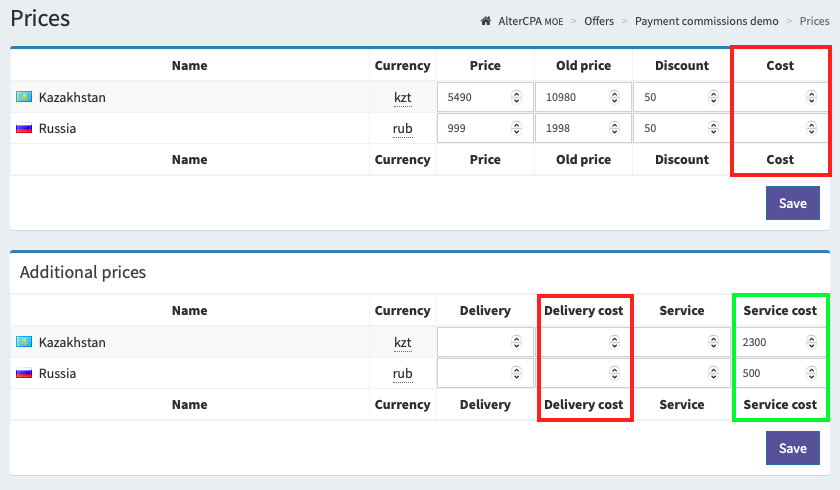
Very important! The delivery cost, product cost, and warehouse product price fields must all be set to zero, or the commission will be calculated incorrectly.
Though there’s a trick here too. You can set up special products with the “Unit item” and “Don’t track quantity” checkboxes turned on, plus a cost of their own. Use those products to reward affiliates for hitting particular milestones. Or assign small costs to your regular products, and turn that into extra payments for upsells and cross-sells.
Commission Analytics
We pay affiliates periodically, and we work out the amounts through the “Source Breakdown” subsection under “Traffic.” Open the stats, pick a period, and check the “Expense” column — that’s your required commission total.
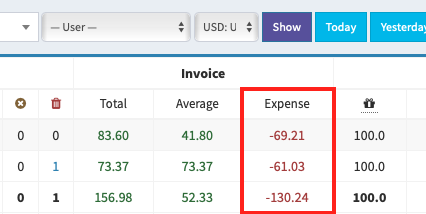
The nice part: affiliates can see this report too. They can gauge the profitability of their own campaigns, manually at least. And remember, every report can be downloaded as an Excel file, so you can calculate any missing values with the simplest of formulas.
Alternative Option
We all learned to use Excel back in school. And every report in AlterCPA Moe can be exported to Excel.
Want to set up a “percentage of the referred order” commission scheme for all your affiliates? Go to “Source Breakdown” under “Traffic,” pick the period and currency you need, and download the file. Into cell R3C17 and all the way down, plug in each affiliate’s percentage. Into cell R3C18, plug in the formula =RC[-1]*RC[-8]/100. Then grab the formula by the scruff of the neck and drag it down from the bottom-right corner.
Want a percentage of the bought-out order instead? Go to delivery analytics, generate and download the report for the period you need. In column 18, next to each affiliate, enter their percentage. In column 19, insert the formula =RC[-1]*RC[-3]/100.
Want a flat commission per completed order? Download the same delivery report, enter the commission amount in column 18, and plug the formula =RC[-1]*RC[-12] into column 19.
The optimal move, of course, would be to just buy the full-featured AlterCPA Pro — but hey, we’re not here for the easy way out.